Replacing repetitive daily invoice entry in Sage 50 Accounts with a scheduled background posting engine, controlled through a simple desktop app that lets non-technical staff change schedules, dates and credentials without touching config files.
Automate the client’s daily batch invoice posting into Sage 50 Accounts reliably and securely, while giving non-technical team members full control over schedules, dates and credentials through an easy desktop interface.
02Executive Summary
Executive Summary
The client’s accounts team spent time every day entering invoices into Sage 50 by hand. We built a desktop automation utility with a background posting engine and a clean control panel, deployed directly to the client’s live environment with logging and error handling.
What changed
Manual daily entry to scheduled automation: invoice batches post in the background.
JSON config edits to a desktop control panel: staff manage settings without code.
Silent failures to clear logs: every batch is logged with status and errors.
Login interruptions to guided handling: authentication prompts handled gracefully.
03The Challenge
The Challenge
Daily invoice posting is repetitive, time-sensitive and error-prone when done by hand, and the solution had to work for people who don’t write code.
Operational pain
Manual labour: routine invoice data entry every day.
Human error risk: mistakes from repetitive typing.
Dependency on IT: any setting change needed someone to edit config files.
No visibility: hard to confirm what was posted and when.
Technical pain
Security prompts: 2FA and CAPTCHA on Sage portals needed custom verification handling.
ERP integration: posting reliably through the Sage 50 COM API / SDK.
Locked-down environment: executables had to be whitelisted on client machines.
Remote deployment: install and configure via remote desktop on live systems.
04Goals and Success Criteria
Goals and Success Criteria
Business goals
Eliminate daily manual invoice entry.
Let non-technical staff change schedules, dates and credentials.
Clear proof of what was posted each day.
Smooth go-live with post-launch support.
Technical goals
Reliable batch posting through the Sage 50 SDK.
Scheduled execution with Windows Task Scheduler.
Robust logging and custom exception handling.
Graceful handling of authentication and lockouts.
05Solution Overview
Solution Overview
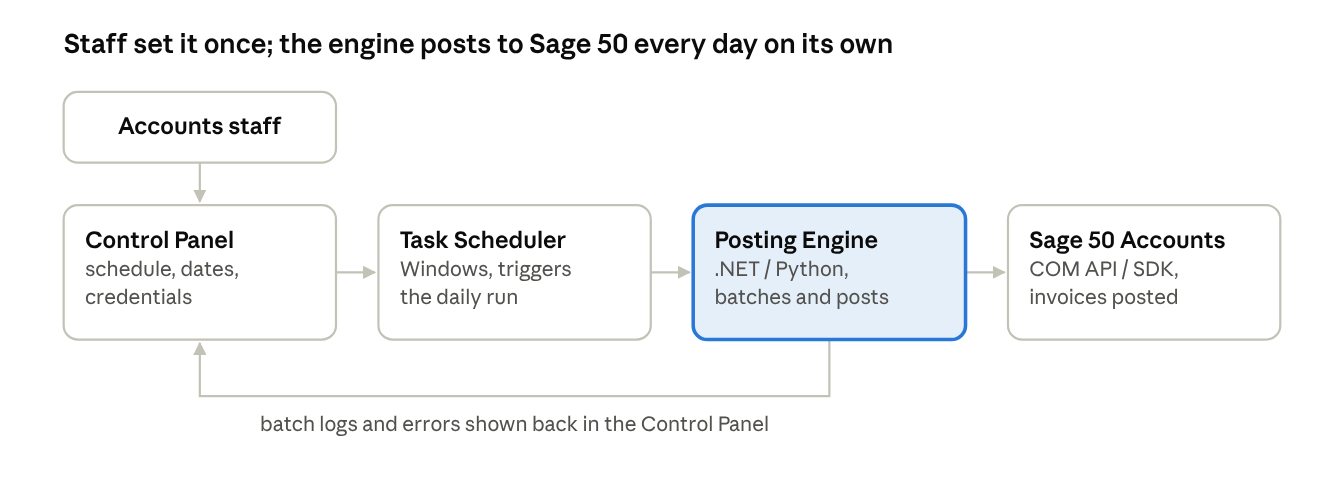
We engineered a custom Windows desktop application and a background execution engine tailored to Sage 50. The desktop app manages all runtime parameters; the engine runs on schedule, batches invoices, posts them into Sage 50 through the SDK and logs every result.
Staff only touch the Control Panel; the scheduler and engine do the daily posting and report results back.
How it works
Configure: staff set the schedule, date range and credentials in the desktop app.
Schedule: Windows Task Scheduler triggers the engine at the configured time.
Post: the engine batches invoices and posts them into Sage 50 via the SDK.
Handle issues: authentication prompts and errors are handled with clear messages.
Verify: every batch is logged, and postings appear in the Sage 50 transaction list.
06Product Modules Delivered
Product Modules Delivered
Module
What it does
Configuration Control Panel
Edit schedule time and date ranges; manage Sage login credentials; no JSON or code editing needed
Automated Posting Engine
Batches daily invoices and posts them directly into Sage 50 via the COM API / SDK, unattended on schedule
Session and Error Management
Handles 2FA / CAPTCHA and authentication lockouts; custom exception handling with clear user prompts
Logging and Monitoring
Live execution log per batch with success and error counts; easy cross-check against the Sage 50 ledger
07Sage 50 Integration and Scheduling
Sage 50 Integration and Scheduling
Component
Role
Sage 50 COM API / SDK
Creates and posts invoice transactions in Sage 50 Accounts
Windows Task Scheduler
Triggers the posting engine daily at the configured time
Desktop Control Panel
Stores schedule, date and credential settings used by the engine
Execution Logs
Records each batch, its result and any errors
Executable Whitelisting
Allows the utility to run inside the client’s secured environment
08Security and Reliability
Security and Reliability
Credential handling: logins managed through the control panel, not plain config files.
Authentication handling: 2FA / CAPTCHA and lockouts handled with clear prompts.
Whitelisted executables: runs within the client’s security policies.
Custom exception handling: failures are caught and reported, not silent.
Detailed logging: every batch and error recorded.
09Delivery Process
Delivery Process
Deployed directly to the client’s live environment via Google Remote Desktop.
Executable whitelisting and Task Scheduler setup completed on client machines.
Staff walkthrough of the control panel and verification of posted batches in the Sage 50 ledger.
90 days of dedicated post-launch support.
10Outcomes and Business Impact
Outcomes and Business Impact
90%+ reduction in manual overhead: daily entry replaced by automated posting.
100% automated workflow: invoice batches process on schedule without intervention.
Seamless user experience: staff adjust settings with zero coding knowledge.
Enterprise delivery: full deployment, whitelisting and 90 days of support.
11Technology Stack
Technology Stack
Area
Technology
Core and scripting
C# / .NET, Python automation engine
ERP integration
Sage 50 Accounts COM API / SDK
User interface
Custom Windows desktop GUI (WPF / Windows Forms)
Environment and tools
Windows Task Scheduler, Google Remote Desktop, executable whitelisting
12Lessons Learned and Best Practices
Lessons Learned and Best Practices
Design for the people who run it: a UI beats config files for non-technical teams and keeps ownership with the accounts team.
Expect authentication friction: plan for 2FA, CAPTCHA and lockouts early, and fail clearly instead of silently.
Logs are the proof: every batch logged with result and errors makes reconciliation with the Sage ledger easy.
Plan the deployment environment: sort whitelisting and permissions up front, and support the handover after launch.
Result
What changed.
90%+ less manual work
Daily invoice entry replaced by scheduled background posting
100% automated runs
Invoice batches post on schedule without intervention
Zero-code settings
Staff change schedules and credentials from a desktop UI
90 days support
Dedicated post-launch support after go-live
Technology
The stack, for the engineers.
Core stack
C# / .NET
Python automation engine
Sage 50 Accounts COM API / SDK
Custom Windows desktop GUI (WPF / Windows Forms)
Windows Task Scheduler
Google Remote Desktop
executable whitelisting
Start a conversation
Discuss a similar project.
Bring the workflow, the system or the feature. An engineer reads every message and replies with a suggested first step, usually a small fixed-price assessment rather than a sales deck.
NDA before you share a brief, a repo or a client name
Your first call is with a senior engineer, not a salesperson
A realistic plan and an honest cost range, whether or not you build with us